Make this season more rewarding
Earn 7.00% APY for 7 months1 or 4.25% APY for 12 months2 on certificates, receive up to $2003 with a new Rewards Checking Account, or save with auto loan rates as low as 3.99% APR for up to 36 months.4

Welcome to Havasu Community Credit Union, a division of CU SoCal. We're glad you're here!
-
To help you save time, we encourage you to take advantage of our self-service tools.
If you’ve logged into LA Financial’s Online or Mobile Banking at least once since January 1, 2024, your profile has automatically transferred to CU SoCal—no need to register again. Simply click the login button and use the same username and password you’ve been using. If you last accessed LA Financial’s Online or Mobile Banking prior to January 1, 2024, you’ll need to register as a new user. Please do not use the “Register for Online Banking” option unless this applies to you.
- Try the “Forgot Username” prompt if you are unsure of your current username.
- Try the “Forgot Password” prompt if you are unsure of your current password.
If you typically log in and are used to seeing all your accounts under one profile, you’ll need to create multiple logins for each account. CU SoCal presents your digital banking profile based on your account, not your social security number.
Need further problem resolution? Please call us at 866.287.6225.
-
For most Members, your Membership number remained the same. However, a small group will see a prefix added to their existing number. Please reference the “Important Information Regarding Your Credit Union Accounts” letter you received prior to June 1 for your new Member number and account information.
To view your “Important Information Regarding Your Credit Union Accounts” letter that includes your Member number and Share I.D.s, log into Online or Mobile Banking.
- If you are using your desktop or laptop to access Online Banking, select the “Tools” menu, “View Documents” and then “Overview.”
- If you are using the Mobile Banking app, select “More” at the bottom right of the screen, Under the “Tools” menu choose “View Documents” and then “Notices.” You will need to enroll in eDocuments to view your eNotices.
Starting June 1, please be sure to update any ACH transfers or automatic payments with your Member/account number and CU SoCal’s routing and transit number (322283796). This will help ensure everything continues to run smoothly.
Need further problem resolution? Please call us at 866.287.6225.
-
Good news—most Members can continue to use their existing username and password when logging into CU SoCal’s Online and Mobile Banking, making the transition smooth and easy. For your convenience, account nicknames and recurring transfers will carry over automatically.
Please note: If you’ve logged into LA Financial’s Online or Mobile banking at least once since January 1, 2024, your profile has automatically transferred to CU SoCal—no need to register again. Simply click the login button and use the same username and password you’ve been using. If you haven’t logged in since before that date, you’ll need to register as a new user. Please do not use the “Register for Online Banking” option unless this applies to you.
- To login your first time, use your existing LA Financial username and password. You’ll be prompted to secure your account by creating a new password.
- Next, agree to the disclosures and verify your Member number, social security number, and birthdate.
- Afterwards you’ll be asked where you would like a verification code sent to complete a multi-factor authentication (Choose from SMS Text, Email, or Voice Call).
After you login, please visit the “Tools” menu to reestablish your custom alerts and notifications for your debit card and account. While viewing your account, take a moment to review that your transfers, nicknames, and preferences have carried over.
Some features in Online and Mobile Banking may look or function differently than what you’re used to. These updates reflect the new experience and are designed to support your banking needs moving forward.
Need your Member number?
Log into Online or Mobile Banking and select the “Accounts” menu. Select the “Account Details” tab or tap the “Show Details” button at the top right side of the app screen. Your full number is listed under “MICR Account Number.”Need further problem resolution? Please call us at 866.287.6225.
-
If you are not an existing LA Financial digital banking user, or have not used LA Financial’s Online or Mobile Banking since prior to January 1, 2024, please register as a new user at CU SoCal’s Online and Mobile Banking. Visit CUSoCal.org/Login or download the CU SoCal App for your Apple or Android device to get started.
Select Register for Online Banking and follow the prompts. Once are registered and have agreed to the disclosures, sign up for eStatements, and verify your contact information.
- If you are using your desktop or laptop to access Online Banking, select the “Tools” menu, “View Documents” and then “Overview.”
- If you are using your device to access the Mobile Banking app, select “More” at the bottom right of the screen, Under the “Tools” menu choose “View Documents.” In the top right-hand corner find “Settings” to subscribe to eStatements.
After enrolling, you will see the eStatement preference as subscribed. You can now select if you would like to see all accounts on your dashboard or if you wish to hide accounts from view.
Need further problem resolution? Please call us at 866.287.6225.
-
Please activate your new Havasu Community Credit Union, a division of CU SoCal, Visa® Debit Card to access your accounts and funds. Your current Havasu Community Debit Card has been deactivated and payments made with it will no longer go through after 7 a.m. June 1.
You can activate your debit card and set up a pin through Online and Mobile Banking.
- If you are using a desktop or laptop computer, visit the “Accounts” menu, then “Card Controls”, and select the desired card.
- If you are using the Mobile Banking app on a mobile device, select “More” at the bottom right of the screen, choose the “Accounts” menu, select “Card Controls,” and swipe to activate your card.
Members received a new Havasu Community Credit Union, a division of CU SoCal, Visa® Debit Card if they have used their current debit card after August 21, 2024, or, if their current card was issued after February 1, 2025, and not yet activated.
To keep things running smoothly, update your card information with any businesses or online retailers that automatically bill your debit card.
If you did not receive a debit card and would like one for your Havasu Community Credit Union, a division of CU SoCal, account, please call us at 866.287.6225 or visit one of our branch locations.
-
Great news—most existing Bill Pay payees integrated into CU SoCal’s Bill Pay so you can pick up right where you left off.
- Electronic payments to individuals did not transfer to the new Bill Pay system. Starting June 1, you can use Zelle® for person-to-person payments or set up External Transfers to move money between your accounts at other financial institutions.
- Bill Pay history did not transfer over. Please view eStatements for transaction history. After logging into CU SoCal’s Online or Mobile Banking select “View Documents” in the Tools Menu. At the top right in Settings, you can Subscribe to eStatements. Your previous eStatements will be available on June 1, 2025.
Need further problem resolution? Please call us at 866.287.6225.
-
Although no transaction history transferred over, your previous statements are available in eStatements.
All Havasu Community Credit Union, a division of CU SoCal, received a paper statement for the period ending May 31, 2025, including those who currently receive eStatements. Due to regulatory requirements, you will need to re-enroll to continue receiving eStatements through CU SoCal’s Online and Mobile Banking.
After logging into CU SoCal’s Online or Mobile Banking select “View Documents” in the Tools Menu. At the top right in Settings, you can Subscribe to eStatements. Your eStatements will be available on June 1, 2025.
CU SoCal charges a paper statement fee of $2; however, this fee will be waived through September 30, 2025, for all Members. The fee will continue to be waived for Members 17 years of age and younger or 64 years of age and better. Beginning October 1, 2025, the $2 fee may be applied to your account. Please review the Schedule of Fees to learn how the fee may be waived.
Need further problem resolution? Please call us at 866.287.6225.
-
-
Good news—All LA Financial Credit Union branches will remain open as part of CU SoCal!
You now have access to 21 additional CU SoCal branches and continue to have access to more than 5,600 Co-op Shared Branches and more than 30,000 surcharge-free Co-op ATMs.
Branch hours are Monday—Friday: 9 a.m. —5 p.m. and Saturday, 9 a.m. —1 p.m., unless otherwise noted. You’re always welcome to visit a branch at your convenience—or, to save time and plan ahead, you can easily schedule an appointment online.
Please visit our Branches and ATMs page for specific location information.
-
Rest assured—your internal transfers will continue without any interruption.
-
CU SoCal is proud to offer Zelle® for fast and easy person-to-person money transfers. Access Zelle® through the Transfer and Pay menu in our Mobile Banking App. For information and videos on how to use Zelle®, visit CUSoCal.org/Zelle.
-
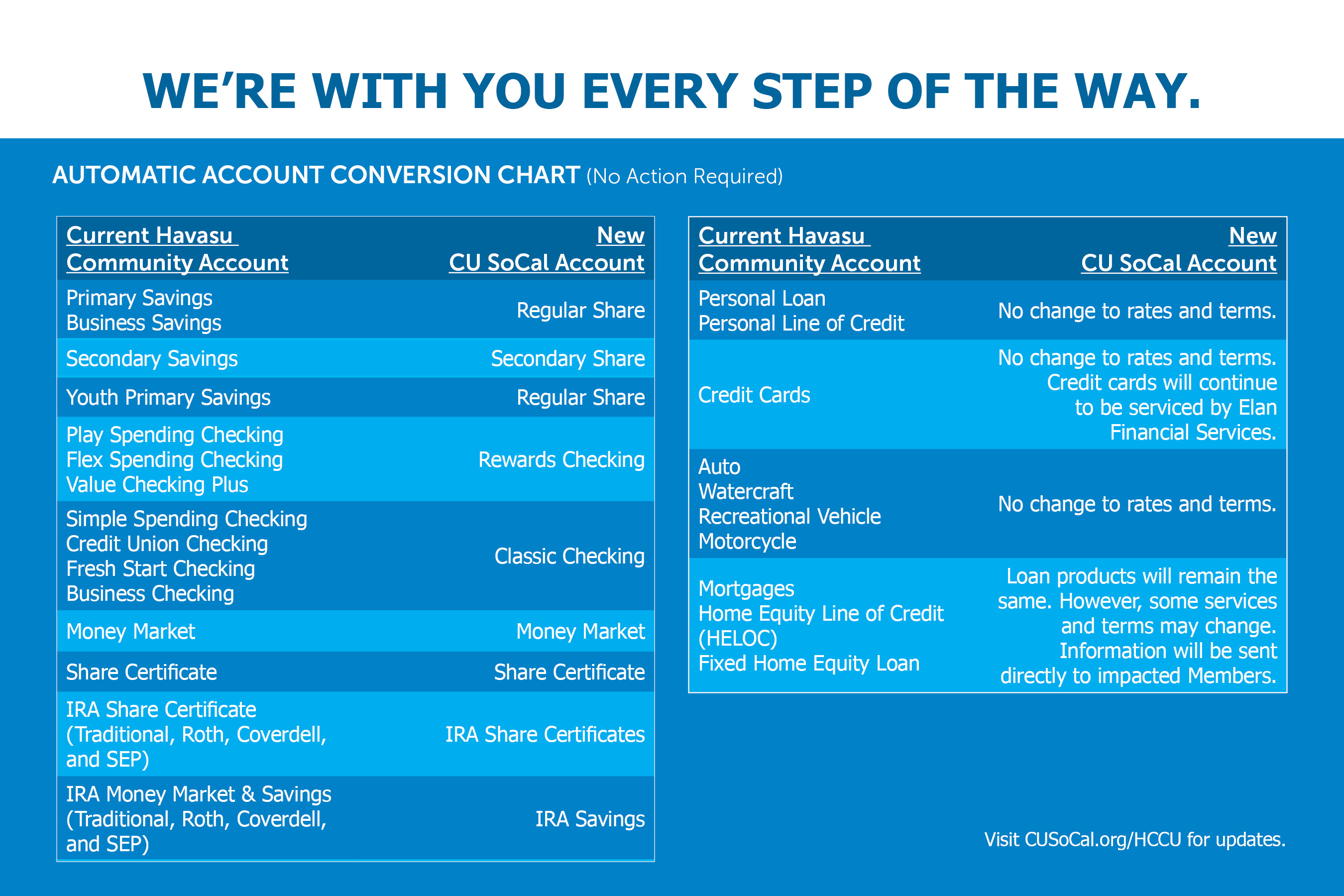
Consumer Loans: There will be no changes to your existing loan terms.
Real Estate Loans: There will be no changes to your existing loan terms. Your real estate loan statement is available within Online and Mobile Banking. Your monthly recurring payments will continue as scheduled.
You are now able to make your home loan payments directly through CU SoCal’s Online and Mobile Banking. This change will make managing your first mortgage, home equity, and commercial loans faster and more convenient.
-
You should have received three temporary Havasu Community, a division of CU SoCal, checks by July 15, 2025, and we encourage you to start using them once they arrive—but there’s no rush! Your current Havasu Community checks will continue to clear as usual through June 1, 2026, giving you plenty of time to make the switch.
If you’d like a free box of Havasu Community, a division of CU SoCal, branded checks, just give us a call at 866.287.6225 or stop by a branch before October 31, 2025. We are happy to order them for you.
If you currently have BaZing benefits along with your checking account, you will continue to receive those perks. Please login to the BaZing app as you normally would to access your BaZing account.
-
Your direct deposits and automatic payments—like payroll, Social Security, and gym memberships—will continue without interruption through June 1, 2026, so there’s no immediate need to make any changes. However, we do recommend updating your payment information as soon as it’s convenient to ensure a smooth transition.
For Social Security updates, you can call 1.800.772.1213 to schedule an appointment or visit ssa.gov. Be sure to have both your current LA Financial account and routing number (322077562), along with your new CU SoCal routing number (322283796).
To update your LACERA Direct Deposit amount by June 1, 2026, visit the LACERA Direct Deposit website for complete details.-
To continue having your entire LACERA check directly deposited at CU SoCal without interruption, please use this form: LACERA Direct Deposit Form
-
If you only have a portion of your LACERA check deposited (payroll deduction), there is no need to update your information. If you would like to change the amount of your partial LACERA deduction being deposited at CU SoCal, please use this form: LACERA Partial Payroll Deduction Form
For all other employers and payroll, use the CU SoCal Direct Deposit Form and submit it to your HR or payroll administrator. -
-
If you have a Havasu Community Credit Card, you’ll continue to use your existing card, which will remain serviced by Elan Financial Services—no need for a replacement.
Credit card payments can no longer be made in a CU SoCal branch or through our Member Care Center. Please be sure to make payments by calling Elan directly at 800.558.3424 or by visiting myaccountaccess.com. You can continue to log in using your current username and password.
rd.
-
Overdraft transfers will continue as currently designated. Overdraft Privilege will be replaced with CU SoCal’s Courtesy Pay as an option to cover transactions when you may not have funds available. You may authorize CU SoCal to pay, rather than return, non-sufficient fund transactions on your everyday debit card transactions for a fee.
All existing opt ins will transition. See our Courtesy Pay brochure and Schedule of Fees for additional information. If you would like to opt in to Courtesy Pay, please fill out the Courtesy Pay Authorization form. Once complete, bring the form to the Havasu branch or any CU SoCal branch.
-
Please view an updated Schedule of Fees and About Your Accounts brochure for more information on what fees may have changed.
-
Your shares will continue to be protected by federal deposit insurance provided through the National Credit Union Share Insurance Fund (NCUSIF), a division of the National Credit Union Administration and backed by the full faith and credit of the United States Government.
-
If you have questions, please call CU SoCal at 866.287.6225. You’re also welcome to visit any CU SoCal branch location. For added convenience, schedule your branch visit at a time that works best for you to save time and avoid waiting.
Please visit our Branches and ATMs page for specific location information.
-
- APY = Annual Percentage Yield. Promotional rate of 7.00% APY for 7 months valid October 15-December 31, 2026. Rates and terms are subject to change without notice. Assumes dividends remain on deposit until maturity; dividends are compounded daily and credited monthly; early withdrawals will reduce earnings. The minimum certificate opening deposit is $500 new funds (defined as money not currently on deposit with CU SoCal); maximum contribution at time of opening is $7,000 and must be received by December 31, 2026. Offer available to CU SoCal Members over the age of 18. New Member online deposits are capped at $7,000 and must originate from an external (non-CU SoCal) account. Promotional certificate deposits via CU SoCal ACH transfers must remain on balance in account for a minimum of 60 days or early withdrawal penalties will apply. We may impose a penalty if you withdraw the principal from your certificate account before the maturity date. The penalty will be 90 days of dividends on the amount withdrawn. If the amount withdrawn reduces the principal balance below the stated minimum, you will be assessed a penalty on the entire principal balance. We will close the certificate account and transfer any remaining balance to your Regular Savings Account. Certificate automatically renews to a 6-month term at maturity at the then current APY unless withdrawn during the grace period; maturity date and terms provided at account opening. Renewal APY is based on your CU SoCal relationship and current rates at the time of renewal. Visit CUSoCal.org/Rates for details. Limit one promotional certificate per primary Member.
- APY=Annual Percentage Yield. Promotional APY and rate are available for a limited time and are subject to change or discontinuation at any time without notice. The annual percentage yield assumes that dividends will remain on deposit until maturity. If you make a withdrawal from your account, your earnings will be reduced. Minimum deposit to open is $500. Must be a CU SoCal Member. All accounts will be verified by ChexSystems® and are subject to approval and Membership eligibility. Dividends will be paid starting the day of deposit. New Member maximum online opening deposit is up to $150,000. Deposits cannot originate from a CU SoCal account. Deposits made to the promotional certificate through electronic transfers (ACH) will not be available for withdrawal for 60 days from the date of deposit. Dividends will be compounded monthly and will be credited monthly and at maturity. We may impose a 180-day penalty if you withdraw the principal from your certificate account before the maturity date. The penalty imposed shall be based on the amount withdrawn. If the amount withdrawn reduces the principal balance below the stated minimum during the term, you will be assessed a penalty on the entire principal balance, and we will close the certificate account and transfer any remaining balance to your Regular Savings Account. This promotion features a fixed 4.17% dividend rate. Your 12-month term will automatically renew into a 12-month certificate at the prevailing rate unless you withdraw all funds in your account at maturity or within a grace period of 7 calendar days after maturity. Your account will mature as reflected on the Rate Schedule. The maturity date will be stated on the certificate or receipt provided to you at the time of opening your account.
- Offer valid October 15-December 31, 2026, and is available to new and existing Members. All accounts will be verified by ChexSystems® and are subject to approval and Membership eligibility. Offer is subject to change without notice. Cash bonus is not available to Members who currently have a CU SoCal Rewards Checking Account or who have closed a Rewards Checking Account within the last 365 days. Account must be open and in good standing at the time bonus is paid. Must be 18 years or older. Offer requires opening a new Rewards Checking Account. See Rewards Checking account terms and requirements at: CUSoCal.org/RewardsChecking. Existing Classic Checking or Aspire Checking account upgrades/conversions are not eligible for this promotional offer. To qualify for the total $200 bonus, which is earned in paid increments for each requirement completed within three calendar months from account opening, Member must: (1) open a new Rewards Checking Account with a minimum $100 deposit and receive $50; (2) complete at least 12 qualifying POS and/or PIN-based debit card transactions (excluding ATM withdrawals, returns, or adjustments) per month, for two consecutive months and receive $50; (3) receive at least $750 in qualifying direct deposits (payroll, pension, government benefits, etc.) per month, for two consecutive months and receive $50; and (4) open and fund an auto or personal loan and receive $50. Partial bonuses will be paid for each individual requirement satisfied. Bonuses will be deposited into the Member’s account within 60 days after verification that each qualifying requirement has been met. Bonus is subject to 1099-INT tax reporting. One Rewards Checking Account per Member. Maximum bonus from promotional offer is $200 and cannot be combined with other offers, which includes CU SoCal’s Care to Share Member referral program.
- Promotional auto offer and rate are available for a limited time and are subject to change or discontinuation at any time without notice. APR – The Annual Percentage Rate of 3.99% is our best rate for up to 36 months and includes a .50% discount for a direct payroll deposit of $750 monthly to your CU SoCal checking account and 0.25% discount for being a Rewards+ Loyalty Member. The discounts are one-time and may be applied at time of origination or within 90 days of origination based on qualification. Rate may adjust if you discontinue direct deposit/payroll. Your rate may be higher depending on credit history and underwriting criteria. Financing available up to 120% of retail vehicle value including tax and license plus optional CU SoCal GAP and Mechanical Repair Coverage. Ask a CU SoCal representative for details. Vehicle models less than 2-years with up to 10,000 miles will be considered new. Vehicle models less than 10-years with up to 120,000 miles will be considered pre-owned. CU SoCal does not finance salvaged title or Lemon Law Buyback vehicles. Payment factor based on maximum term. Minimum payment on all vehicle loans is $100. Amount financed may not exceed 120% retail Kelley Blue Book® including tax, license, warranty, etc. With 90-day payment deferment, interest will continue to accrue as of funding date. Offer cannot be used for internal refinances.
Open Account
Leaving Our Website
If you click ‘Continue’ an external website that is owned and operated by a third-party will be opened in a new browser window. CU SoCal provides links to external websites for the convenience of its Members. These external websites may not be affiliated with or endorsed by the credit union. Use of these sites are at the user’s risk. These sites are not under the control of CU SoCal and CU SoCal makes no representation or warranty, express or implied, to the user concerning:
- the information, content, presentation, accuracy or opinions of these sites, or
- the quality, safety or suitability of any software found on these sites.
You are continuing to a credit union branded third-party website administered by our service provider. We are not responsible for the third-party’s data privacy practices, services, or overall content on the third-party site. Please review the service provider’s privacy policy for more information about its data privacy practices.
Using a hyperlink may identify you as a CU SoCal Member to the operator of the external site.
CU SoCal does not provide and is not responsible for the product, service or overall website content available at these sites. The privacy policies of CU SoCal do not apply to linked websites and you should consult the privacy disclosures on these sites for further information.
If you click ‘Cancel’ you will be returned to the CU SoCal website.